
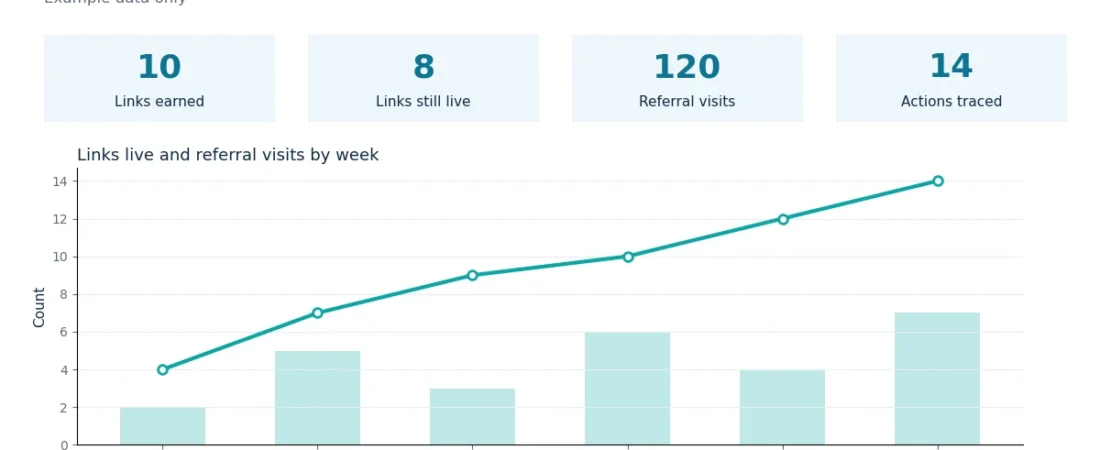
Link building ROI is a simple question with a hard answer. You spend time and money to earn links, and you want to know what those links returned. Without a clear method, you may credit links for results they did not cause. You may also blame them for results they did not hurt.
This guide gives you that method. First, it defines what to count on each side. Next, it shows how to pick a fair window. Then, it explains what can distort the result. You will not find a promised return here.
What Link Building ROI Means
Link building ROI means the return you get from the links you earn, compared with what you spent to earn them. In plain terms, it asks whether the links were worth the effort. However, the return is not one number. It has several parts, and each part needs its own record.
For example, a link can send referral visits. It can also help a page become easier to find. In addition, it can support trust in your site over time. These returns do not arrive on the same day. Therefore, a single score will hide more than it shows.
Start by defining the return for your own site. For a shop, the return may be orders that started from a linked page. Write your definition down before you count anything. If the definition changes halfway through, your result will not mean much.
Link Building ROI: What to Count
To measure link building ROI, count both sides with the same care. On the cost side, record every input that went into earning the links. On the return side, record only results you can trace to a link or a linked page. If a cost or a return is missing, say so in your notes. A gap in the record is better than a guessed number.
First, count the direct costs. These include fees paid to writers, outreach tools, and any person whose time went into the work. Next, count the time your own team spent. Time is a real cost, even when no invoice arrives for it.
Then, count the links themselves. Record how many links went live, how many are still live, and which pages they point to. A link that was removed is not the same as a live link. Check the live status before you count a link as a return. The guide on how to monitor backlinks shows a simple way to keep this check regular.
Finally, count the results on the linked pages. Useful results include referral visits from the linking page, visits to the linked page, and actions on that page, such as a sign up or a purchase. Use your own analytics for these numbers. Do not use a tool score as a result. Use the Google Search Console Links report to check which pages link to your site and which pages they point to. The backlink quality metrics guide explains what to look for in a source page, so use it to judge links by more than a score.
Costs and Results at a Glance
Choose a Measurement Window
A measurement window is the period you use to judge the result. Pick it before you start, and do not move it to fit the numbers. If you move the window after you see the result, you are choosing the story, not measuring it.
First, allow time for the link to take effect. A new link does not change a page on the day it goes live. Readers need time to find it, and search engines need time to find and weigh it. Therefore, a window of a few days is too short for most sites. A window of several weeks is more honest.
Next, match the window to the page. A news page may show a fast response, because readers arrive quickly and then move on. A guide page may show a slow response, because readers find it over months. If you judge a guide page after one week, you will miss most of its return.
In addition, use the same window for every link in one review. If you give one link four weeks and another link four months, the comparison is not fair. Set the window in advance, record it, and apply it to all the links in that review.
Link Building ROI: The Tracking Framework
A tracking framework is a simple record that links each cost to each result. It does not need fancy software. A sheet with clear columns will do, as long as you fill it in the same way every time.
First, create one row for each link. Record the linking page, the linked page, the date the link went live, and the anchor text. Next, add the cost for that link, or the share of the total cost that belongs to it. Then, add the results for the linked page over your chosen window.
Then, check the record each week. Confirm that each link is still live, and note any link that changed or disappeared. A link that moved to a different page is a different link now, so record the change. If you skip the weekly check, your final count may include links that no longer exist.
Finally, review the sheet at the end of the window. Compare the total cost with the total traced result, and write a short note on what you found.
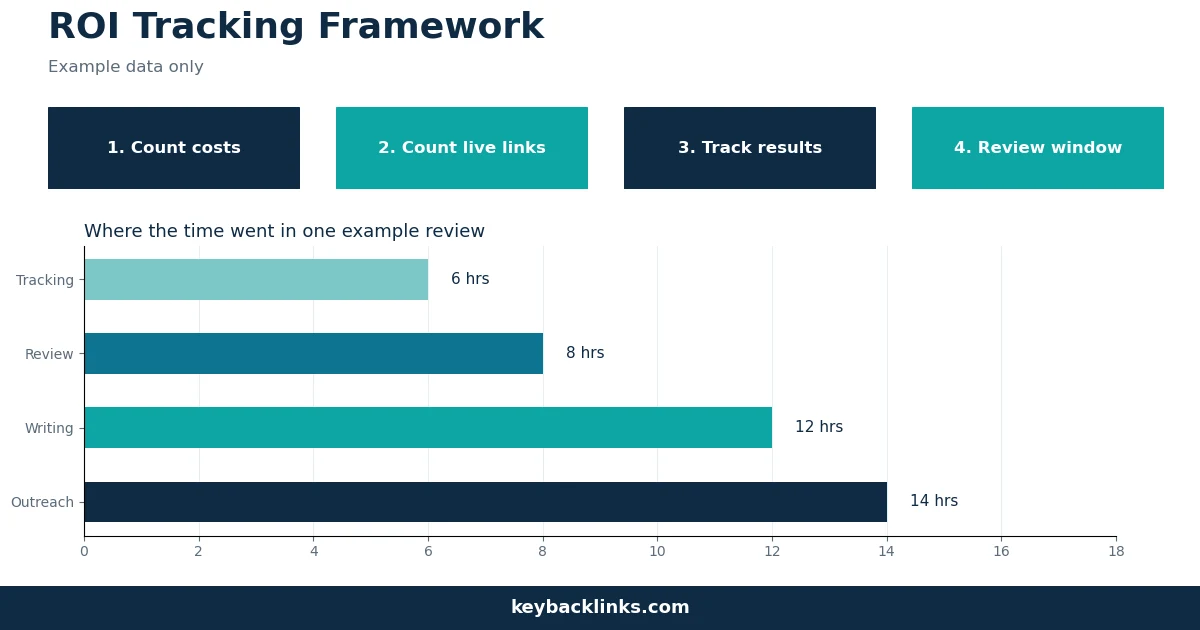
Example chart: the numbers shown are example data for illustration only.
What Confounds the Measurement
A confound is a change that affects your result but has nothing to do with your links. If you ignore confounds, you may credit a link for a result that came from somewhere else. Therefore, list the confounds before you judge the result.
First, other marketing can lift the same page. A social post, an email, or a paid ad can send visits to a linked page at the same time as a new link. If you count all those visits as link return, the result will be too high. To avoid this, record other campaigns that touched the same page during your window.
Second, site changes can move the result. A new page design, a faster page, or a fixed error can change how readers act on a page. If such a change happened during your window, note it next to the result.
Third, season and news can move the result. A holiday, a sale, or a news event can change demand for a topic in a short time. A guide about a seasonal topic may gain visits in one month and lose them in the next, with no change in links. Therefore, compare the result with the same period in an earlier cycle when you can. If you cannot, say so in your note.
Example Results Summary
The table below shows example numbers only. These are illustration figures, not results from any real site or campaign.
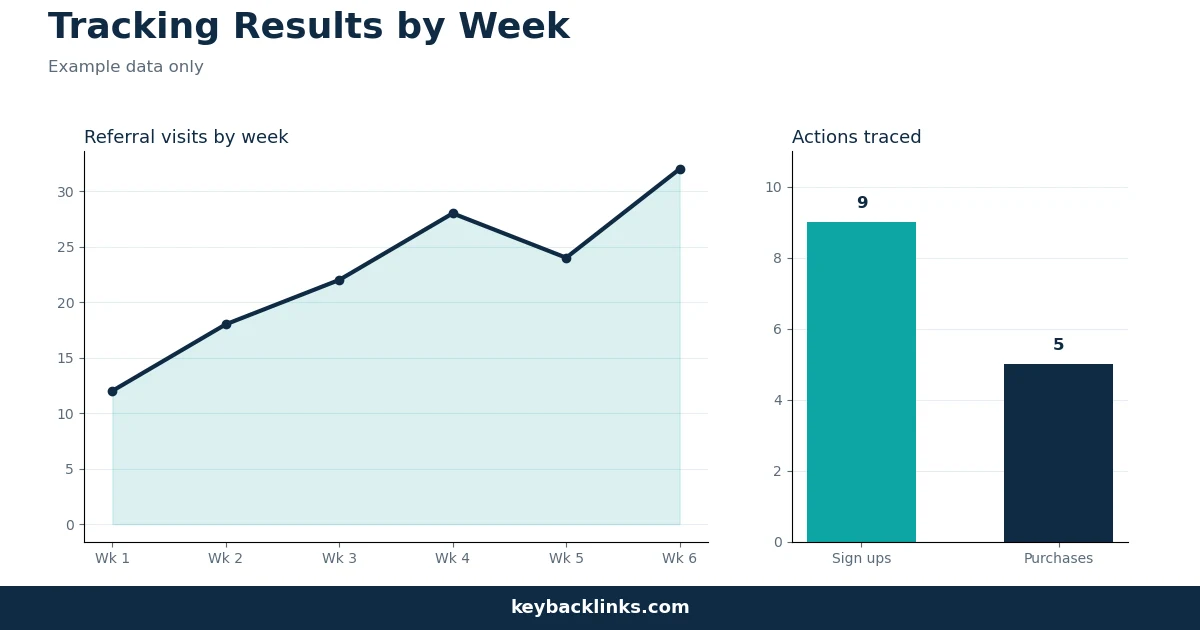
Example chart: the numbers shown are example data for illustration only.
Common Mistakes in Link Building ROI
First, do not judge a link after one day. A link needs time to send readers and to be found. Wait for your chosen window to close before you judge.
Second, do not count a tool score as a return. A third party score is an estimate, not a result. It can help you sort links, but it cannot prove that a link earned a visit or a sale.
Third, do not mix windows. If you compare a link measured over one month with a link measured over six months, the longer window will almost always look better. Use the same window for every link in a review.
Fourth, do not hide the costs. If you leave out your own time, the return will look better than it was. Record hours with the same care as fees.
Finally, do not promise a return before you measure it. No link can guarantee a ranking, a visit, or a sale. A link can support a page, and a good page can earn trust over time. However, the result depends on the page, the source, and the reader.
Frequently Asked Questions
What is link building ROI?
Link building ROI is the return from the links you earned, compared with what you spent to earn them. It covers the costs, the live links, and the results you can trace to those links, such as referral visits and actions on the linked pages.
How long should I wait before I measure link building ROI?
Wait for the window you set before you started. For most pages, several weeks is a fair minimum, because readers and search engines need time to find the link. A guide page may need longer, while a news page may show a faster response. Do not move the window to fit the numbers.
What costs should I include in link building ROI?
Include all the costs that went into earning the links. That means writer fees, tool fees, and the hours your team spent on outreach, writing, and review. If you leave out time, the return will look better than it was. Record each cost in the same sheet as the result.
Conclusion
Link building ROI is a method, not a promise. Start by defining the return for your site. Then, count the full cost, including time, and count only the results you can trace. Pick a window before you start, use the same window for every link, and record the confounds that touched the same pages.
Finally, keep the record simple and honest. A sheet that shows live links, traced visits, actions, and full costs will tell you more than a single score. Review it on the same schedule, and use your note to decide what to do next.