
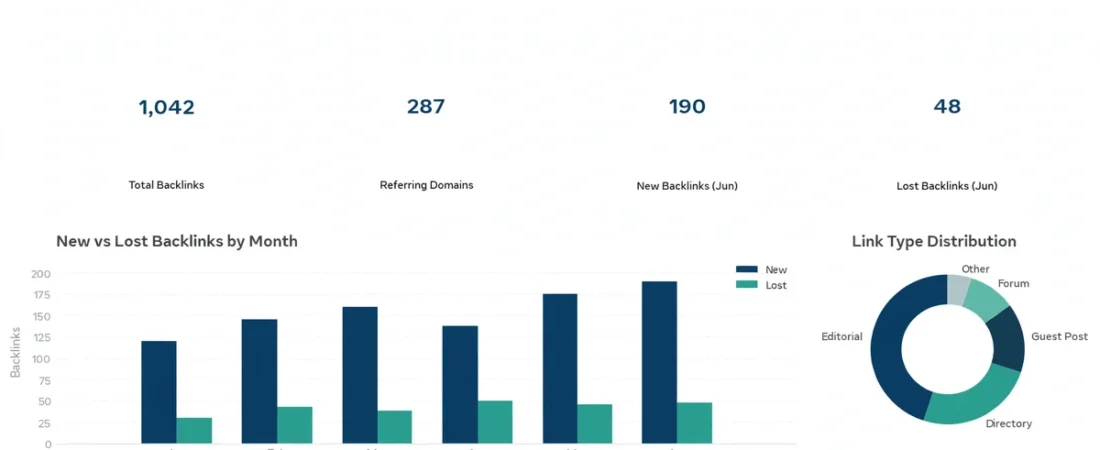
Backlink profile analysis is the skill of reading the links that point to your site. It shows which sites link to you, how those links change over time, and which pages earn the most links. This guide explains how to analyze backlinks step by step.
A profile is more than a total count. For example, two sites can have the same number of links and very different profiles. One may have links from many sites, while the other has many links from one site. Therefore, read the mix, the growth, and the anchors together, not one number alone.
What a Backlink Profile Is
A backlink profile is the full set of links that point to your site. It includes the source pages, the target pages, the anchor text, and the link type. It also covers when links first appeared and when they were lost.
Think of it as a record of trust. Each link is a sign that another page found your page worth a reference. However, not all signs carry the same weight. For example, a link in the main content of a relevant page is easier to trust than a footer link. For that reason, a good backlink profile analysis looks at the pattern, not only the total.
Backlink Profile Analysis: Start with the Totals
Start with three totals: total links, referring domains, and linked pages. First, count the total links that point to your site. Next, count the referring domains, the unique sites that link to you. Then, count the pages on your site that receive at least one link.
Total links show the size of the profile. Referring domains show how wide it is. In addition, linked pages show how much of your site earns links. For example, many links from few domains means a narrow profile. In contrast, fewer links from many domains means a wider profile.
Next, compare the totals with the last review. A slow and steady rise is normal for a site that publishes useful content. However, a sudden jump needs a closer look. First, open the new links and check where they came from. Then, check whether a popular page lost links. Use one source for these totals each time. The Google Search Console Links report is a free source that shows the pages that link to you.
Read the Referring Domain Mix
Referring domains are the sites that link to you. The mix matters more than the count. A healthy mix has links from varied sites in your own topic area. In contrast, a narrow mix has most links from one kind of site, or from a small set of domains.
First, sort your referring domains by link count. Next, look at the top ten. Then, ask three questions for each one. Is the site on a topic close to yours? Does it link to a page that fits its own topic? Does the link sit in the main content? If the answer is yes for most of the top domains, the mix looks sound.
Next, look at the long tail. However, check the share of the top domains. If one domain supplies a large share of all links, your profile depends on that one source. As a result, note it as a risk.
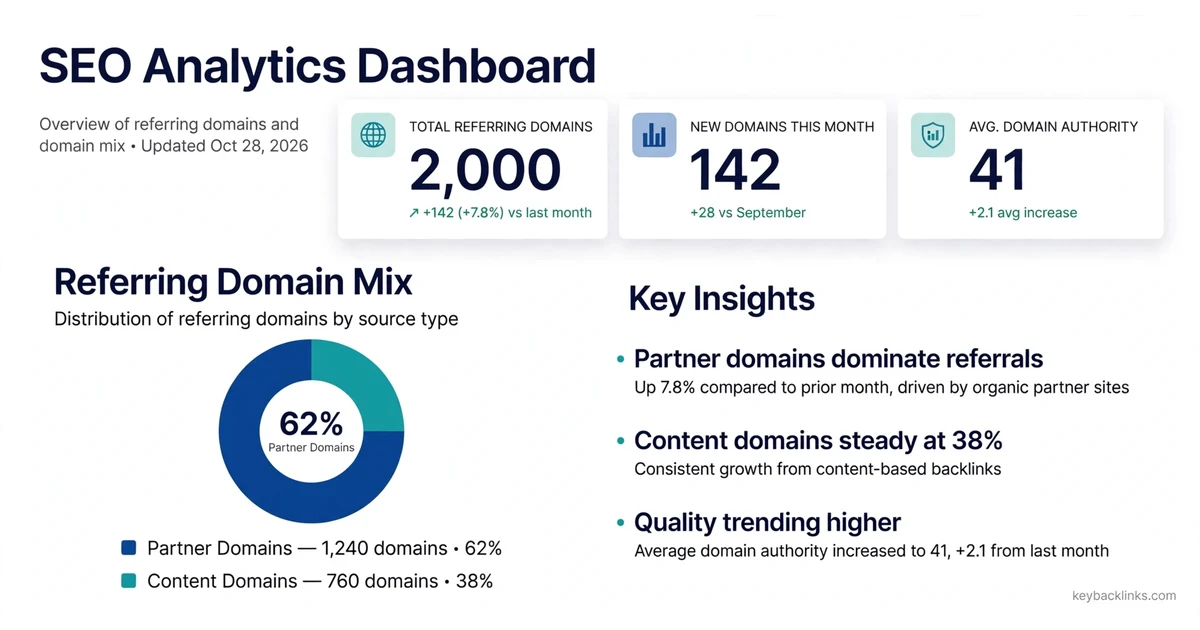
Example chart: referring domain mix, partner domains 62 percent with 1,240 domains, content domains 38 percent with 760 domains. Example data only, not real results.
Referring Domain Mix: Example Results
The table below shows an example mix, not real results.
Read Link Growth Over Time
Link growth is the change in your profile over time. First, plot it month by month. A steady rise is a good sign, and a flat line is normal for a site that publishes little. However, a sharp rise or fall is a signal to look closer.
Next, look at total links by month. Then, look at referring domains by month. If total links rise fast while referring domains stay flat, the new links come from sites that already linked to you. As a result, that growth is less valuable than new links from new domains.
Also, check the pace over the last three months. A small change is normal. However, a large change needs a cause. For example, a new guide may have earned many links. In contrast, a site redesign may have broken links. Finally, judge growth over a quarter, not over a single week.
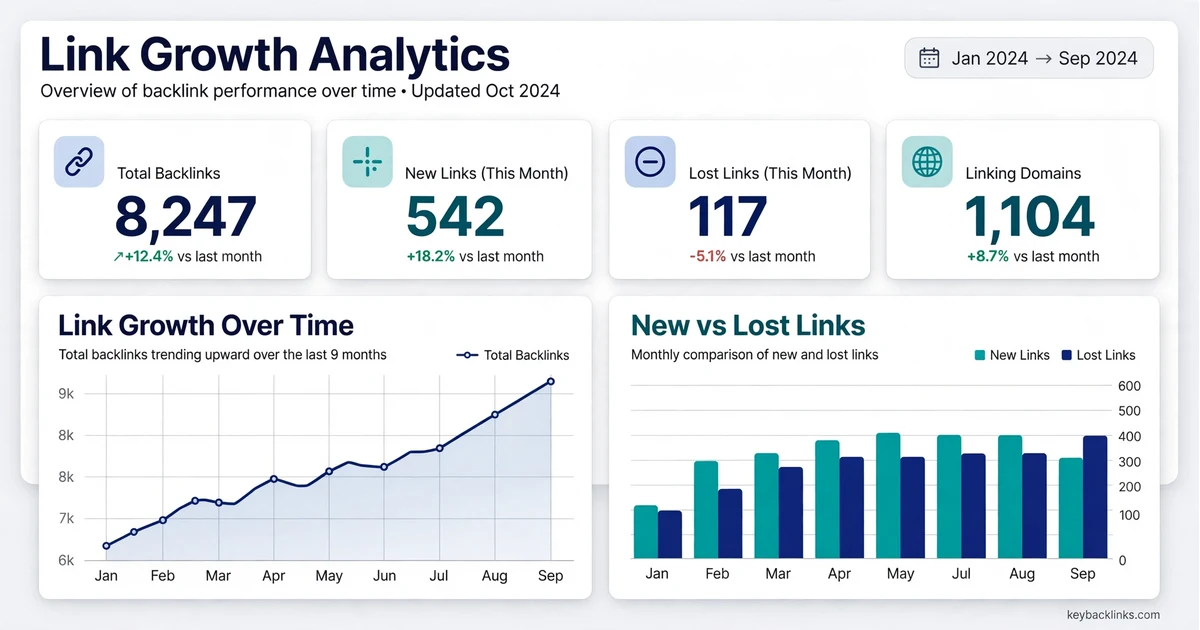
Example chart: link growth, total backlinks 8,247, new links 542, lost links 117, linking domains 1,104. Example data only, not real results.
Backlink Profile Analysis: Read the Anchor Mix
Anchor text is the clickable text of a link. The anchor mix is the pattern of those words across your whole profile. A natural mix is varied. It has brand names, page titles, plain web addresses, and short phrases that describe the linked page.
First, list the most common anchors. Next, group them by type. Then, look at the share of each group. A profile where one commercial phrase dominates is a pattern to review. In contrast, a profile where brand names and page titles lead the list often looks normal.
Also, check anchors by target page, since each page should attract anchors that match its topic. For example, a guide about monitoring links should attract anchors about monitoring and tracking. However, if it attracts anchors about a different product, open the source page and check the context. Do not use a fixed percentage rule. Instead, compare your mix with your own past reviews. For a deeper review of anchors, see our guide on anchor text analysis.
Compare New Links and Lost Links
New links and lost links are the two sides of growth. New links show what is working. In contrast, lost links show what needs care. Therefore, read them together each month in your backlink profile analysis.
First, list the new links. Next, sort them by referring domain, then check the top ones. Are they from relevant pages, and do they point to the right target? A new link from a strong and relevant page is a good sign. However, a new link from a thin or unrelated page is worth a closer look.
Then, list the lost links. Sort them the same way. For each lost link that matters, find the cause. The source page may have been deleted. In addition, the link may have been removed in a redesign. Or the target page may have moved. Finally, compare the counts. In a healthy profile, new links usually outnumber lost links over a quarter. For links that were lost but still matter, our guide on link reclamation explains how to ask for a fix.
Read Which Pages Earn Links
In most profiles, a small set of pages earns most of the links. However, the useful question is whether the right pages earn links.
First, list your pages by link count. Next, look at the top ten. Do they match your most useful pages? A guide, a study, or a clear answer page often leads. However, if a thin or outdated page leads the list, check why it attracts links. Then, look at the pages with no links. However, if an important page has no links after months, it may need a better internal link or a clearer title. For a wider view of what makes a link strong, read our guide on backlink quality metrics.
A Simple Monthly Reading Routine
Use the same routine each month, so each review is easy to compare with the last one. First, export your links from the Google Search Console Links report. Next, save the export with the date in the file name. Then, record the three totals: total links, referring domains, and linked pages.
After that, list the new and lost links since your last review, sorted by referring domain. Next, review the top ten of each list. For each one, note the source, the target, the anchor, and the placement. Then, check the anchor mix and the referring domain mix. Finally, write a short note: what changed, what caused it, and what needs action. Keep the note to a few lines.
Common Mistakes When Reading a Profile
Many reviews go wrong in the same ways. First, some teams judge a profile by total links alone. A rising total can hide a narrow mix, a weak anchor pattern, or links from few domains. Therefore, always read the mix with the total.
Next, some teams act on one month of data. A single month is often noise. For example, a link can appear late in a tool, or a lost link can return after a fix. Therefore, judge growth over a quarter, and check the cause before you act.
Another mistake is to treat a third-party score as a verdict. A vendor score is an estimate, not a Google signal. Use it only to sort a long list. However, always open the source page before you decide. The Ahrefs guide on what makes a high-quality backlink explains how a vendor describes these signals. Finally, some teams skip the record. So record what you found.
Frequently Asked Questions
What is backlink profile analysis?
Backlink profile analysis is a review of all the links that point to your site. It reads the domain mix, link growth, anchor mix, and new and lost links.
How often should I read my backlink profile?
Read it once a month, or after a large change such as a site move, a redesign, or a new content campaign.
How is backlink profile analysis different from a backlink audit?
Backlink profile analysis is the reading of the profile: the mix, the growth, and the anchors. In contrast, a backlink audit is the wider review that follows, with checks, decisions, and fixes. For that reason, use the backlink audit checklist when you are ready to act on what the reading showed.
Conclusion
Backlink profile analysis is a habit, not a one-time task. First, start with the three totals. Then, read the referring domain mix, the growth over time, the anchor mix, and the new and lost links. Finally, compare each review with the last one, and record what changed and why.
A clear reading needs the same source each month, a short note, and a calm look at the pattern. So read the profile first, and act only on real evidence.