

Learning how to check backlinks tells you which sites link to a website and which pages they point to. A backlink check is a one-off look at a link profile. It answers a simple question. Who links to this site right now?
First, a check is not the same as monitoring. Monitoring tracks links over time. A check reads the picture once. For example, you may check a site before an audit, after a site move, or when a new set of links appears. Next, this guide shows the full process. You will also learn how to check backlinks of a website you own and how to find backlinks to a website you do not own.
What a Backlink Check Shows
A backlink check shows the links that point to a website. Each link has a source page, a target page, and anchor text. The source page is the page where the link sits. The target page is the page it points to. The anchor text is the clickable word or phrase.
In addition, a check shows two counts. The first count is total links. The second count is referring domains, the number of different websites that link to the site. For example, 200 total links from only 20 domains means a small set of sites links many times.
However, counts alone do not tell you if a link is good. A link from a relevant page that readers trust is worth more than a link from a page with no clear topic. Therefore, always read the source page, not just the count.
How to Check Backlinks Step by Step
Follow these steps in order.
Step 1: Pick the Website and the Page. First, decide what you want to check: a whole website, such as example.com, or one page, such as a guide. A whole-site check gives you the full picture. Next, write down the exact address, including www if the site uses it.
Step 2: Open a Link Report. Then, open a link report for that address. If you own the site, use Google Search Console. It shows the links Google has found to your site. If you do not own the site, use a free backlink checker tool.
Step 3: Read the Link Count and the Referring Domains. Next, read the two main counts: total links and referring domains. Write both numbers down. Do not judge the site by one number alone. For example, a new site may show only a few links, and that is normal.
Step 4: Review the Source Pages. Then, look at the list of source pages. Open the top pages and read them. Ask three questions. Is the page relevant to your topic? Does the link sit in the main content? Does the page look like a real page a reader would use?
Step 5: Check the Anchor Text and the Target Page. Next, check the anchor text for each important link. The anchor should describe the linked page in simple words. Then, check the target page. Does the link point to the page the reader expects? A link that points to the exact guide is a strong match. For a closer look at anchors, read the anchor text analysis guide.
Step 6: Record What You Found. Finally, record the result in a simple sheet. Note the date, the address you checked, the total links, the referring domains, and the top source pages. That is how to check backlinks in one pass, and the record lets you compare the next check with this one.
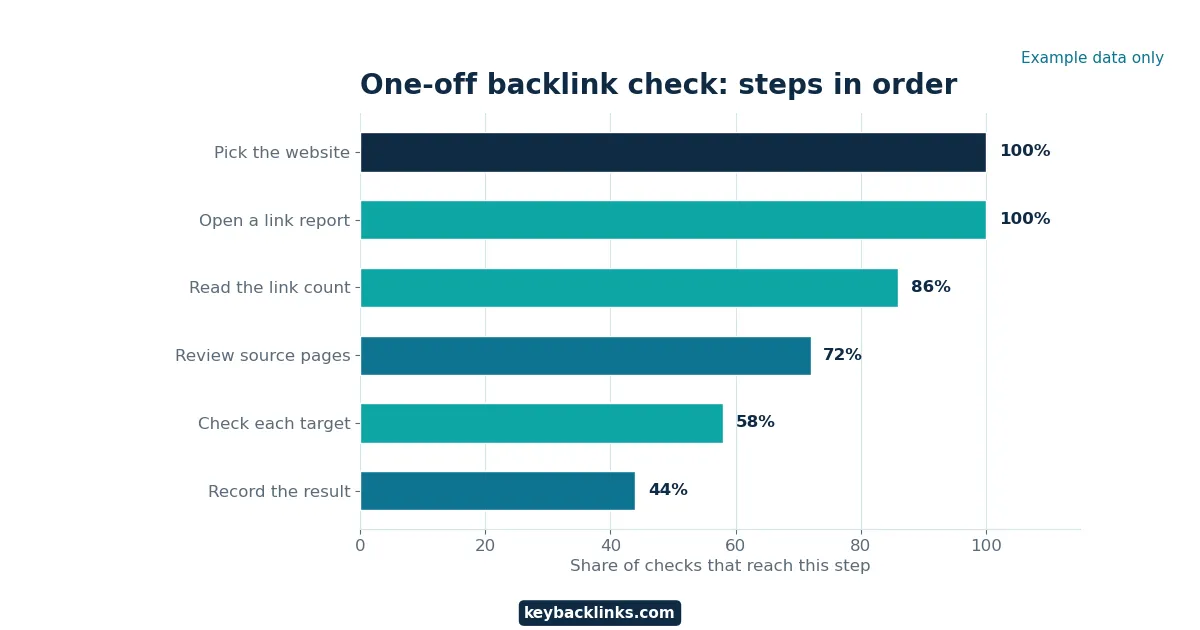
Example chart. The numbers shown are example data for illustration only.
How to Check Backlinks of a Website You Own
If you own the site, start with Google Search Console. It is free, and it shows the links Google has found to your site. First, open Search Console and pick your site. Next, open the Links report. Then, look at the top linking sites and the top linked pages.
In addition, the Links report shows three useful lists: the sites that link to you most, your pages that get the most links, and the anchor text used most often. Search Console also shows links to pages that no longer exist. If a link points to a page you moved, fix the redirect on your own site first. The backlink audit checklist walks through this review in full.
How to Check Backlinks of Any Website
To find backlinks to a website you do not own, use a free backlink checker tool. This is how to check backlinks for a site you do not own. These tools crawl the web and keep a list of links they have found. You type in the address, and the tool shows a summary of total links, referring domains, and source pages.
First, pick one tool and stick with it for the check. Different tools crawl different parts of the web. As a result, two tools can show different counts for the same site. Next, read the summary the same way you read your own site. Look at total links and referring domains first, then open the top source pages.
However, keep the limits in mind. A free checker may show only a sample of the links, and it may show older data. Therefore, use a free check to learn the shape of a link profile, not to count every single link.

Example chart. The numbers shown are example data for illustration only.
What the Numbers Mean
The table below explains the main numbers. A number without context can mislead you.
Neither number proves quality on its own. Always open the source pages and read them. That is the heart of learning how to check backlinks well.
Example Results Summary
The table below shows example numbers from a small check. These numbers are example data only.
Free Backlink Checker Tools: What to Compare
Free backlink checker tools are useful for a one-off check. They do not all work the same way. Therefore, compare them on a few clear points before you trust a result.
First, compare the size of the sample. Some free tools show only the top links, and a small sample is fine for a quick look but not enough for a full audit. Next, compare how fresh the data is. If the data is old, a new link may not appear yet.
Then, compare what the tool shows for free. A tool that shows the source pages is more useful, because you can open each page and read it yourself. Finally, do not trust a tool score on its own. Some tools give each link a score. That score is a guess based on the tool’s own data. It does not prove that a link is good or bad. Always read the source page before you act. For more on what makes a link strong, read the backlink quality metrics guide.
Common Mistakes When You Check Backlinks
First, do not judge a site by the total link count alone. A large count can come from a small set of sites. Always read the referring domain count beside it.
Second, do not trust a single tool. Different tools see different links. If one tool shows a low count, run the same check in another tool before you conclude anything.
Third, do not skip the source page. A link that looks good in a list can look weak on the page. For example, it may sit in a footer or a sidebar with no context. Open the page and read the sentence around the link.
Fourth, do not act on one odd anchor. A single strange anchor is normal. A pattern across many links is what matters. If the same phrase repeats on many sites, note it and look closer.
Fifth, do not mix up a check with monitoring. A check reads the links once. Monitoring watches them over time. If you need to watch for new or lost links, use the how to monitor backlinks guide.
Frequently Asked Questions
Can I learn how to check backlinks for free?
Yes. Google Search Console is free for sites you own. Free backlink checker tools can show a sample of links for any site. However, free tools may show only part of the list. Use them for a quick look, not for a full audit.
Why do two tools show different link counts?
Two tools show different counts because they crawl different parts of the web. Each tool keeps its own list of links. As a result, one tool may find links the other tool has not found yet. Therefore, compare the source pages, not just the counts.
How often should I check backlinks?
Learning how to check backlinks once every few months is enough for most sites. In addition, check after a site move, after a big content launch, or when a new set of links appears. If you check too often, the numbers will barely change.
Conclusion
A backlink check is a simple habit. First, pick the site, open a link report, read the counts, and review the source pages. Then, record what you found and note what needs a fix. That is how to check backlinks in short.
In contrast, a check is only the first step. It shows you the picture once. If you want to watch links over time, set up monitoring next. The how to monitor backlinks guide shows how to do that. Finally, keep the check honest, and do not judge a site by one number.